Raylib: Normal Mapping On Billboard Sprites
I’ve been working on a raylib game engine mainly just to work on something while I job-hunt. It helps keep my mind focused on something and makes me happy. Making software and games tends to do that. I picked raylib, a C++ graphics library, because it popped up on searches and reported to be a pretty easy to get into framework. For the most part, that’s kinda true.
I have, at the time of writing, hit some issues with trying to set up my rendering pipeline. Trying to set up both PBR and deferred shading took so much longer than ideal mostly because the examples on their website don’t all work. Many don’t appear to have been updated properly to consistently function, such as the deferred shading example. But! I was able to power through, and with a lot of trial and error, not to mention liberal use of debugging software, I was able to get my pipeline working.
For models.
For my game, I wanted Billboards to be the stars of the show. Which meant I needed lighting on them as well.
Looking over raylib, there’s nothing there to suggest even vaguely how this might be done so that doesn’t help. It’s clear it’s a matter of working out how to apply each texture to a Billboard Sprite but these sprites don’t carry materials so don’t get treated like a model. Trying to either include them in my new graphics pipeline or build a seperate one just for them caused a number of headaches.
I could just use the r3d library, which does report to do what I’m looking for but I imagined I would also need to implement the whole of the library to make use of this. I’d already put in a ton of a work getting to this point; stripping it out and starting again seemed deflating. Plus, I was using raylib-c++, a C++ library that wraps many of the C elements of raylib to make it a little nicer to work with. I wasn’t sure how compatible both would be and wasn’t up for finding out.
So, after many many many many more days worth of working this out, I finally got it working. Billboard Sprites could now be lit similarly to a model, all using mostly the same pipeline.
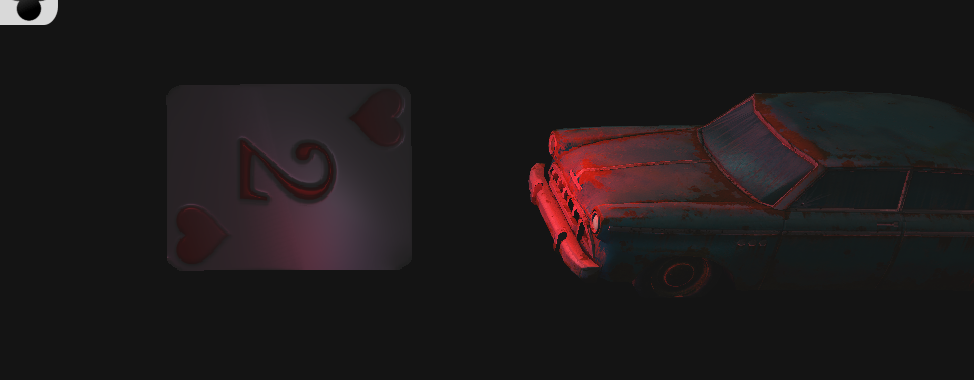
Look at the card! Notice how it’s reflecting light and has divots around the heart symbols and the number in the middle. It looks way better than just a flat texture, which is what Billboard Sprites normally look like. Granted, needs some fiddling with to look better but this is enough to get on with the rest of the program with. Good is fine for now, perfect can come later when it’s all done.
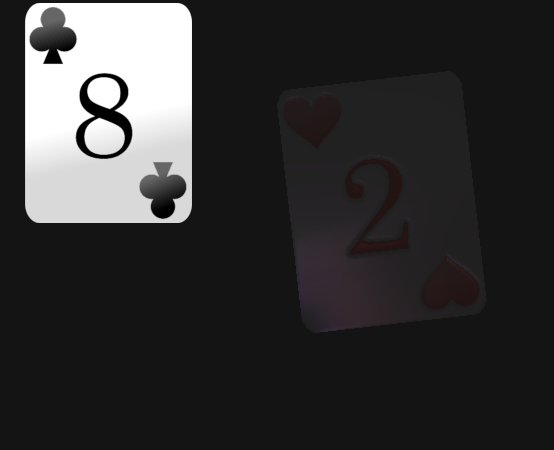
The Spade Card on the left is being rendered as a Sprite, but a Billboard Sprite would normally rendered in much the same way. Because characters would be represented by a Billboard Sprite in my game because I can handle 2D Assets far easier and quicker than 3D ones, I want the effect of the Heart Card on the right. I want to not only have these cards react to the light they’re currently in, but also be able to fake some normal mapping for extra detail. I could even manage some emissive textures, as that was included in the PBR example for the old car model.
I now attempt to pass it on so that, I hope, fewer devs suffer as I did. My code is a little rough but hopefully illustrative. It’s presented as fully as reasonable.
How Does a Billboard get drawn to the screen?
Simple; it’s a mesh with a sprite slapped on it.
When a Billboard is rendered, it calculates the points it needs to create a flat surface for the sprite to display. Then, it’ll apply a rotation multiplication to these 3D points according to the angle it’s supposed to be looking. Naturally, that will always be towards the camera we have active. The two triangles a billboard is made up of are now facing the right way and then are sent to the GPU. Raylib’s normal shaders then draw this to the screen using the perspective provided and all done.
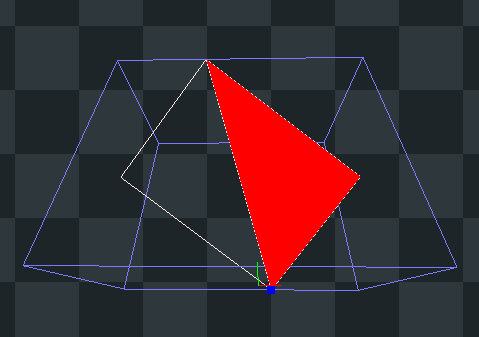
As you can see, there’s only two triangles with only six verticies. This is a screenshot from RenderDoc, a tool I’ve been using to help understand what the GPU is doing showing off how simple each billboard is. This is also why all the ‘character’ bits are being done in Billboards; it’s pretty cheap and easy to put on screen.
The important part is that, in a way, the Billboard is making up verticies on the fly we need to pass over to our shader by calculating them on the CPU. Two triangles isn’t much so it’s no big deal. Normally, the Billboard drawing function is buried away and not easily accessible but it’s possible to make and modify our own.
So, How Do We Add Proper Rendering?
Step 1: Copy the Billboard Drawing Method
We just make our own render function to modify as we go. We don’t use the built in one, we use this one.
void BillboardSprite::renderBillboardTextureObject(Camera camera, Texture2D texture, Rectangle source,
    Vector3 position, Vector3 up, Vector2 size, Vector2 origin, float rotation, Color tint) {
    // Compute the up vector and the right vector
    Matrix matView = MatrixLookAt(camera.position, camera.target, camera.up);
    Vector3 right = { matView.m0, matView.m4, matView.m8 };
    right = Vector3Scale(right, size.x);
    up = Vector3Scale(up, size.y);

    // Flip the content of the billboard while maintaining the counterclockwise edge rendering order
    if (size.x < 0.0f)
    {
        source.x -= size.x;
        source.width *= -1.0;
        right = Vector3Negate(right);
        origin.x *= -1.0f;
    }
    if (size.y < 0.0f)
    {
        source.y -= size.y;
        source.height *= -1.0;
        up = Vector3Negate(up);
        origin.y *= -1.0f;
    }

    // Draw the texture region described by source on the following rectangle in 3D space:
    //
    //                size.x          <--.
    //  3 ^---------------------------+ 2 \ rotation
    //    |                           |   /
    //    |                           |
    //    |   origin.x   position     |
    // up |..............             | size.y
    //    |             .             |
    //    |             . origin.y    |
    //    |             .             |
    //  0 +---------------------------> 1
    //                right
    Vector3 forward;
    if (rotation != 0.0) forward = Vector3CrossProduct(right, up);

    Vector3 origin3D = Vector3Add(Vector3Scale(Vector3Normalize(right), origin.x),
        Vector3Scale(Vector3Normalize(up), origin.y));

    Vector3 points[4];
    points[0] = Vector3Zero();
    points[1] = right;
    points[2] = Vector3Add(up, right);
    points[3] = up;

    for (int i = 0; i < 4; i++)
    {
        points[i] = Vector3Subtract(points[i], origin3D);
        if (rotation != 0.0) points[i] = Vector3RotateByAxisAngle(points[i], forward,
            rotation*DEG2RAD);
        points[i] = Vector3Add(points[i], position);
    }

    // Calculate Normals from Points
    Vector3 normals[4];

    normals[0] = this->calculateNormalFromPoints(points[0], points[1], points[3]);
    normals[1] = this->calculateNormalFromPoints(points[1], points[2], points[0]);
    normals[2] = this->calculateNormalFromPoints(points[2], points[3], points[1]);
    normals[3] = this->calculateNormalFromPoints(points[3], points[0], points[2]);

    Vector2 texcoords[4];
    texcoords[0] = (Vector2){ (float)source.x/texture.width,
        (float)(source.y + source.height)/texture.height };
    texcoords[1] = (Vector2){ (float)(source.x + source.width)/texture.width,
        (float)(source.y + source.height)/texture.height };
    texcoords[2] = (Vector2){ (float)(source.x + source.width)/texture.width,
        (float)source.y/texture.height };
    texcoords[3] = (Vector2){ (float)source.x/texture.width,
        (float)source.y/texture.height };

    Texture2D SPECULARTEX = *this->textureAtlas_Specular->getAtlasTexture();
    Texture2D NORMALTEX = *this->textureAtlas_Normal->getAtlasTexture();
    Texture2D OCCLUSIONTEX = *this->textureAtlas_Occlusion->getAtlasTexture();

    this->billboardGbuffer->setShaderTextureValue(this->normalLoc, NORMALTEX);
    this->billboardGbuffer->setShaderTextureValue(this->specularLoc, SPECULARTEX);
    this->billboardGbuffer->setShaderTextureValue(this->occlusionLoc, OCCLUSIONTEX);

    rlSetTexture(texture.id);

    rlBegin(RL_QUADS);

        rlColor4ub(tint.r, tint.g, tint.b, tint.a);
        for (int i = 0; i < 4; i++)
        {
            // Add Tex Coords, Vertex and Normals
            rlTexCoord2f(texcoords[i].x, texcoords[i].y);
            rlVertex3f(points[i].x, points[i].y, points[i].z);
            rlNormal3f(normals[i].x, normals[i].y, normals[i].z);
        }

    rlEnd();
    rlSetTexture(0);
}

Vector3 BillboardSprite::calculateNormalFromPoints(Vector3 v0, Vector3 v1, Vector3 v2) {
    Vector3 edge1 = Vector3Subtract(v1, v0);
    Vector3 edge2 = Vector3Subtract(v2, v0);
    Vector3 normal = Vector3Normalize(Vector3CrossProduct(edge1, edge2));

    return normal;
}
Step 2: Calculate a Model Matrix
We’re going to calculate a Model Matrix so we can pass it to the shader for calculating game space in the shader.
void BillboardSprite::calculateModelMatrix(Vector3 up, Vector3 right, Vector3 forward, Vector2 calculatedScale) {
    Matrix matScale = MatrixScale(this->getScaleX(), this->getScaleY(), this->getScaleZ());
    Matrix matRotation = MatrixRotate(up, this->rotation*DEG2RAD);
    Matrix matTranslation = MatrixTranslate(this->getX(), this->getY(), this->getZ());

    this->modelMatrix = MatrixMultiply(MatrixMultiply(matScale, matRotation), matTranslation);
}
Step 3: Render the Billboard to it’s own version of the gBuffer shader from the Deferred Shader example
So, firstly we have to modify the new version of the render function. For the most part, we’re just handing new things to our shader. This is where we send the textures we’re looking to use to the shader, along with the Model Matrix we calculated earlier. We also calculate normal values for the points created that are also passed to the shader along with everything else.
The Billboard Sprite Render Function
The render function on the Billboard Sprite is now feeding the various textures we’re expecting to the Graphics Buffer shader specifically for Billboards as that’s used to translate them into data that’ll fit into the gBuffer.
Not how we’re also including some modifications to ensure the Billboard Sprite is also always pointing at the designated camera. It also needs to be able to switch the texture around to different animation frames, so that’ll also be included here.
void BillboardSprite::render() {
    if (!this->getVisible()) {
        return;
    }

    raylib::Texture2D* atlasTexture = this->textureAtlas_Deffuse->getAtlasTexture();

    this->calculateRenderedPosition();

    if (atlasTexture->IsValid() && this->currentFrameID != "") {
        int emissiveIntensityLoc = this->billboardGbuffer->getShaderLocation("emissivePower");
        int metallicValueLoc = this->billboardGbuffer->getShaderLocation("metallicValue");
        int roughnessValueLoc = this->billboardGbuffer->getShaderLocation("roughnessValue");
        int aoValueLoc = this->billboardGbuffer->getShaderLocation("aoValue");

        this->billboardGbuffer->setShaderValue(metallicValueLoc, &this->metalness, SHADER_UNIFORM_FLOAT);
        this->billboardGbuffer->setShaderValue(roughnessValueLoc, &this->roughness, SHADER_UNIFORM_FLOAT);
        this->billboardGbuffer->setShaderValue(aoValueLoc, &this->occlusion, SHADER_UNIFORM_FLOAT);

        this->drawBillboardTexture(atlasTexture);
    }
}

void BillboardSprite::drawBillboardTexture(raylib::Texture2D* atlasTexture) {
    raylib::Rectangle frameRect = this->textureAtlas_Deffuse->getFrameRect(this->currentFrameID);
    bool isFrameRotated = this->textureAtlas_Deffuse->getFrameRotated(this->currentFrameID);

    raylib::Vector2 calculatedScale{0.0f, 0.0f};
    float invertedTextureScale = 1 / this->textureAtlas_Deffuse->getTextureScale();

    if (isFrameRotated) {
        calculatedScale = raylib::Vector2(
            this->getScaleX() * invertedTextureScale,
            (frameRect.height/frameRect.width) * this->getScaleY() * invertedTextureScale
        );
    } else {
        calculatedScale = raylib::Vector2(
            (frameRect.width/frameRect.height) * this->getScaleX() * invertedTextureScale,
            this->getScaleY() * invertedTextureScale
        );
    }

    // the forward direction of the camera (look direction)
    Vector3 forward = Vector3Subtract(this->camera3D->target, this->camera3D->position);

    // the up vector we start with - but this up vector is not orthogonal to the forward vector
    Vector3 up = { 0.0f, 1.0f, 0.0f };

    // compute the right vector using the cross product of the up and forward vector
    // this vector is orthogonal to the forward vector
    Vector3 right = Vector3CrossProduct(up, forward);

    // compute the up vector using the cross product of the forward and right vector
    // the result is orthogonal to the forward and right vector, so it's now pointing up in
    // the orientation of the camera itself
    up = Vector3CrossProduct(forward, right);

    // normalize the up vector so it's unit length
    up = Vector3Normalize(up);

    this->calculateModelMatrix(up, right, forward, calculatedScale);

    this->billboardGbuffer->setShaderMatrixValue(this->matModelLoc_gBuffer, this->modelMatrix);

    this->renderBillboardTextureObject(
        *this->camera3D,
        *atlasTexture,
        frameRect,
        raylib::Vector3(this->getX(), this->getY(), this->getZ()),
        up,
        calculatedScale,
        raylib::Vector2(0.5f, 0.5f),
        this->getRotation() + (isFrameRotated ? 90 : 0),
        raylib::Color::White()
    );
}
From here, we have a Billboard Verson of the Graphics Buffer shader that is outputting the snapshots of texture data we need to write to the buffer. I’m using Specular and Occlusion textures for my billboards then combining them together into an MRA texture rather roughly but appears to work. Makes it easier to render out properly later.
Scene Renderer 3D
I made a Scene Renderer Class for handling my rendering pipeline.
#include <engine/render/scene_renderer_3D.h>

SceneRenderer3D::SceneRenderer3D() {
    ShaderManager shadermanager = ShaderManager();

    this->gBuffer = shadermanager.getShaderPtr("gbuffer");
    this->gBufferBill = shadermanager.getShaderPtr("gbuffer_billboard");

    this->deferredShader = shadermanager.getShaderPtr("deferred");

    this->lightList = std::vector<Light>{};

    this->ambientColor = raylib::Color::White();

    this->graphicsBuffer = new GraphicsBuffer();

    this->deferredShader->enableShader();
        int gPosition = rlGetLocationUniform(this->deferredShader->getID(), "gPosition");
        int gNormal = rlGetLocationUniform(this->deferredShader->getID(), "gNormal");
        int gAlbedo = rlGetLocationUniform(this->deferredShader->getID(), "gAlbedo");
        int gEmissive = rlGetLocationUniform(this->deferredShader->getID(), "gEmissive");
        int gMRA = rlGetLocationUniform(this->deferredShader->getID(), "gMRA");

        this->deferredShader->setShaderValue(gPosition,
            &this->graphicsBuffer->texUnitPosition, RL_SHADER_UNIFORM_SAMPLER2D);
        this->deferredShader->setShaderValue(gNormal,
            &this->graphicsBuffer->texUnitNormal, RL_SHADER_UNIFORM_SAMPLER2D);
        this->deferredShader->setShaderValue(gAlbedo,
            &this->graphicsBuffer->texUnitAlbedo, RL_SHADER_UNIFORM_SAMPLER2D);
        this->deferredShader->setShaderValue(gEmissive,
            &this->graphicsBuffer->texUnitEmissive, RL_SHADER_UNIFORM_SAMPLER2D);
        this->deferredShader->setShaderValue(gMRA,
            &this->graphicsBuffer->texUnitMRA, RL_SHADER_UNIFORM_SAMPLER2D);
    this->deferredShader->disableShader();
}

SceneRenderer3D::~SceneRenderer3D() {
    this->graphicsBuffer->readyForDrawing();
    this->graphicsBuffer->endBufferDrawing();

    delete this->gBuffer;
    delete this->gBufferBill;
    delete this->deferredShader;

    this->lightList.clear();
}

void SceneRenderer3D::createNewLight(std::string id, LightType type, raylib::Vector3 position,
    raylib::Vector3 target, float intensity, raylib::Color color) {
    Light newLight = Light(id, type, this->lightList.size(), position, target, intensity, color);
    this->lightList.push_back(newLight);
}

void SceneRenderer3D::setUpRenderer() {
    this->setUpRendererShader(this->deferredShader);
}

void SceneRenderer3D::setUpRendererShader(RenderingShader* shader) {
    int gammaLoc = shader->getShaderLocation("gamma");
    float gammaValue = GAMMA;
    shader->setShaderValue(gammaLoc, &gammaValue, SHADER_UNIFORM_FLOAT);

    int exposureLoc = shader->getShaderLocation("exposure");
    float exposureValue = HDR_EXPOSURE;
    shader->setShaderValue(exposureLoc, &exposureValue, SHADER_UNIFORM_FLOAT);

    // Setup additional required shader locations, including lights data
    int lightCountLoc = GetShaderLocation(shader->shaderInstance, "numOfLights");
    int maxLightCount = this->lightList.size();
    shader->setShaderValue(lightCountLoc, &maxLightCount, SHADER_UNIFORM_INT);

    // Setup ambient color and intensity parameters
    Vector3 ambientColorNormalized = (Vector3){ this->ambientColor.r/255.0f,
        this->ambientColor.g/255.0f, this->ambientColor.b/255.0f };
    float ambientIntensity = AMBIENT_INTENSITY;

    shader->setShaderValue("ambientColor", &ambientColorNormalized, SHADER_UNIFORM_VEC3);
    shader->setShaderValue("ambient", &ambientIntensity, SHADER_UNIFORM_FLOAT);

    ::rlEnableDepthTest();
}

void SceneRenderer3D::clearRenderer() {
    this->graphicsBuffer->readyForDrawing();
    this->graphicsBuffer->endBufferDrawing();
}

void SceneRenderer3D::setUpLighting(raylib::Camera3D* camera) {
    this->updatingLighting(camera, this->deferredShader);
}

void SceneRenderer3D::updatingLighting(raylib::Camera3D* camera, RenderingShader* shader) {
    float cameraPos[3] = { camera->position.x, camera->position.y, camera->position.z };
    shader->setShaderValue(shader->getShaderLocation(SHADER_LOC_VECTOR_VIEW), cameraPos,
        SHADER_UNIFORM_VEC3);

    for (int i = 0; i < this->lightList.size(); i++) {
        this->lightList.at(i).UpdateLightValues(&shader->shaderInstance);
    }
}

// Get the gBuffer ready for drawing
void SceneRenderer3D::readyBufferForDrawing() {
    this->graphicsBuffer->readyForDrawing();
    this->graphicsBuffer->disableColorBlending();
}


// Render a Billboard Sprite to the GBuffer
void SceneRenderer3D::beginRenderBillboard(raylib::Camera3D* camera) {
    // Base Render Pass
    camera->BeginMode();
        this->gBufferBill->enableShader();
}

void SceneRenderer3D::endRenderBillboard(raylib::Camera3D* camera) {
        this->gBufferBill->disableShader();
    camera->EndMode();
}


// Render a Model to the GBuffer
void SceneRenderer3D::beginRenderModel(raylib::Camera3D* camera) {
    // Base Render Pass
    camera->BeginMode();
        this->gBuffer->enableShader();
}

void SceneRenderer3D::endRenderModel(raylib::Camera3D* camera) {
        this->gBuffer->disableShader();
    camera->EndMode();
}

// Process and display the rendered frame, adding lighting at the last step
void SceneRenderer3D::processRender(raylib::Camera3D* camera) {
    this->graphicsBuffer->enableColorBlending();

    this->graphicsBuffer->endBufferDrawing(); // Stop drawing to the gBuffer

    camera->BeginMode();
        this->graphicsBuffer->disableColorBlending();
            this->deferredShader->rlEnableShader(); // << Deferred Shader

                // Bind each texture in the gBuffer, ready for the shader to use
                this->graphicsBuffer->bindPositionTexture();
                this->graphicsBuffer->bindNormalTexture();
                this->graphicsBuffer->bindAlbedoTexture();
                this->graphicsBuffer->bindEmissiveTexture();
                this->graphicsBuffer->bindMRATexture();

                ::rlLoadDrawQuad(); // << Draw the frame to the frame buffer
            this->deferredShader->rlDisableShader();
        this->graphicsBuffer->enableColorBlending();
    camera->EndMode();

    this->graphicsBuffer->blitBuffer(); // << Blit the frame to framebuffer to be displayed to the screen
}
Graphics Buffer
I also made a Graphics Buffer class to make that easier to work with by grouping lots of raylib OpenGL calls together. Largely based on the example from raylib’s website
#include <engine/render/gbuffer.h>

GraphicsBuffer::GraphicsBuffer() {
    // TODO: Recreate this for Billboards
    this->gBufferData = {0};
    this->gBufferData.framebufferId = ::rlLoadFramebuffer();
    if (this->gBufferData.framebufferId == 0) TraceLog(LOG_WARNING, "Failed to create framebufferId");

    // Enable Frame Buffer
    rlEnableFramebuffer(this->gBufferData.framebufferId);

    // Create Memory Areas for Textures
    this->gBufferData.positionTextureId = rlLoadTexture(NULL, SCREEN_WIDTH,
        SCREEN_HEIGHT, RL_PIXELFORMAT_UNCOMPRESSED_R16G16B16, 1);
    this->gBufferData.normalTextureId = rlLoadTexture(NULL, SCREEN_WIDTH,
        SCREEN_HEIGHT, RL_PIXELFORMAT_UNCOMPRESSED_R16G16B16, 1);
    this->gBufferData.albedoTextureId = rlLoadTexture(NULL, SCREEN_WIDTH,
        SCREEN_HEIGHT, RL_PIXELFORMAT_UNCOMPRESSED_R8G8B8A8, 1);
    this->gBufferData.emissiveTextureId = rlLoadTexture(NULL, SCREEN_WIDTH,
        SCREEN_HEIGHT, RL_PIXELFORMAT_UNCOMPRESSED_R16G16B16, 1);
    this->gBufferData.MRATextureID = rlLoadTexture(NULL, SCREEN_WIDTH,
        SCREEN_HEIGHT, RL_PIXELFORMAT_UNCOMPRESSED_R16G16B16, 1);

    // Set Active Draw Buffers
    ::rlActiveDrawBuffers(5);

    // Connect each rendered texture buffer to the main buffer ID
    rlFramebufferAttach(this->gBufferData.framebufferId, this->gBufferData.positionTextureId,
        RL_ATTACHMENT_COLOR_CHANNEL0, RL_ATTACHMENT_TEXTURE2D, 0);
    rlFramebufferAttach(this->gBufferData.framebufferId, this->gBufferData.normalTextureId,
        RL_ATTACHMENT_COLOR_CHANNEL1, RL_ATTACHMENT_TEXTURE2D, 0);
    rlFramebufferAttach(this->gBufferData.framebufferId, this->gBufferData.albedoTextureId,
        RL_ATTACHMENT_COLOR_CHANNEL2, RL_ATTACHMENT_TEXTURE2D, 0);
    rlFramebufferAttach(this->gBufferData.framebufferId, this->gBufferData.emissiveTextureId,
        RL_ATTACHMENT_COLOR_CHANNEL3, RL_ATTACHMENT_TEXTURE2D, 0);
    rlFramebufferAttach(this->gBufferData.framebufferId, this->gBufferData.MRATextureID,
        RL_ATTACHMENT_COLOR_CHANNEL4, RL_ATTACHMENT_TEXTURE2D, 0);

    // Create Depth Buffer
    this->gBufferData.depthRenderbufferId = ::rlLoadTextureDepth(SCREEN_WIDTH, SCREEN_HEIGHT, true);
    rlFramebufferAttach(this->gBufferData.framebufferId, this->gBufferData.depthRenderbufferId,
        RL_ATTACHMENT_DEPTH, RL_ATTACHMENT_RENDERBUFFER, 0);

    // Make sure our framebufferId is complete
    // NOTE: rlFramebufferComplete() automatically unbinds the framebufferId, so we don't have to rlDisableFramebuffer() here
    if (rlFramebufferComplete(this->gBufferData.framebufferId)) {
        TraceLog(LOG_INFO, "Framebuffer is complete");
    } else {
        TraceLog(LOG_WARNING, "Framebuffer is NOT complete");
    }
}

GraphicsBuffer::~GraphicsBuffer()
{
    ::rlUnloadFramebuffer(this->gBufferData.framebufferId);

    ::rlUnloadTexture(this->gBufferData.positionTextureId);
    ::rlUnloadTexture(this->gBufferData.normalTextureId);
    ::rlUnloadTexture(this->gBufferData.albedoTextureId);
    ::rlUnloadTexture(this->gBufferData.emissiveTextureId);
    ::rlUnloadTexture(this->gBufferData.MRATextureID);

    ::rlUnloadTexture(this->gBufferData.occlusionTextureId);
    ::rlUnloadTexture(this->gBufferData.specularTextureId);

    ::rlUnloadTexture(this->gBufferData.depthRenderbufferId);
}

void GraphicsBuffer::readyForDrawing() {
    ::rlEnableFramebuffer(this->gBufferData.framebufferId);
    ::rlClearColor(0, 0, 0, 0);
    ::rlClearScreenBuffers();  // Clear color and depth buffer
}

void GraphicsBuffer::enableColorBlending() {
    ::rlEnableColorBlend();
}

void GraphicsBuffer::disableColorBlending() {
    ::rlDisableColorBlend();
}

void GraphicsBuffer::endBufferDrawing() {
    ::rlDisableFramebuffer();
    ::rlClearScreenBuffers(); // Clear color & depth buffer
}

void GraphicsBuffer::bindPositionTexture() {
    ::rlActiveTextureSlot(this->texUnitPosition);
    ::rlEnableTexture(this->gBufferData.positionTextureId);
}

void GraphicsBuffer::bindNormalTexture() {
    ::rlActiveTextureSlot(this->texUnitNormal);
    ::rlEnableTexture(this->gBufferData.normalTextureId);
}

void GraphicsBuffer::bindAlbedoTexture() {
    ::rlActiveTextureSlot(this->texUnitAlbedo);
    ::rlEnableTexture(this->gBufferData.albedoTextureId);
}

void GraphicsBuffer::bindEmissiveTexture() {
    ::rlActiveTextureSlot(this->texUnitEmissive);
    ::rlEnableTexture(this->gBufferData.emissiveTextureId);
}

void GraphicsBuffer::bindMRATexture() {
    ::rlActiveTextureSlot(this->texUnitMRA);
    ::rlEnableTexture(this->gBufferData.MRATextureID);
}

void GraphicsBuffer::blitBuffer() {
    // As a last step, we now copy over the depth buffer from our g-buffer to the default framebufferId
    ::rlBindFramebuffer(RL_READ_FRAMEBUFFER, this->gBufferData.framebufferId);
    ::rlBindFramebuffer(RL_DRAW_FRAMEBUFFER, 0);
    ::rlBlitFramebuffer(0, 0, SCREEN_WIDTH, SCREEN_HEIGHT, 0, 0, SCREEN_WIDTH,
        SCREEN_HEIGHT, 0x00000100); // GL_DEPTH_BUFFER_BIT
    ::rlDisableFramebuffer();
}
Step 4: Render the Contents in the GBuffer to the Screen
Data captured, textures applied and now they get put on the screen. The hard part is getting the deferred shading up and running. Everything else is getting it to fit in the data buffers.
The Scene
A Scene object using all this to render to the screen
void Scene::onRender() const {
    this->sceneRenderer3D->setUpLighting(this->camera3D); // Ensure lighting variables are up to date

    // Render Models to the gBuffer
    this->sceneRenderer3D->beginRenderModel(this->camera3D);
        this->sceneRenderer3D->readyBufferForDrawing(); // << Ready the gBuffer for drawing
        this->signal_render_3D.emit(); // << Call the Render Event for all 3D Models to render to the current location
    this->sceneRenderer3D->endRenderModel(this->camera3D);

    // Render Billboard Sprites to the gBuffer
    this->sceneRenderer3D->beginRenderBillboard(this->camera3D);
        this->signal_render_3D_BILLBOARD.emit(); // << Call the Render Event for all Billboard Sprites to render to the current location
    this->sceneRenderer3D->endRenderBillboard(this->camera3D);

    // Process and show the rendered frame to the screen
    this->sceneRenderer3D->processRender(this->camera3D);

    // Any 3D elements that need to be rendered over the top of other things (normally debug objects)
    this->camera3D->BeginMode();
        this->signal_render_3D_OVER.emit();
    this->camera3D->EndMode();

    // 2D elements rendered over the top
    if (this->use2DCamera) {
        this->camera2D->BeginMode();
            this->signal_render_2D.emit();
        this->camera2D->EndMode();
    } else {
        this->signal_render_2D.emit();
    }
}
Billboard GBuffer Shader
The main one that’s important to show off is the GBuffer shader. This is where we actually do the needed work but it’s not that complex. The shader I’m using for the final lighting pass is largely similar to the deferred shader but with some modifications to satisfy my own quibbles with syntax and to fit in a PBR effect.
Vertex Shader
As you can see, it largely calculates the position and normals of the vertex, making all the needed derrived values expected for the Frag Shader
#version 330 core

in vec3 vertexPosition;
in vec2 vertexTexCoord;
in vec3 vertexNormal;
in vec4 vertexTangent;

out vec3 fragPosition;
out vec2 fragTexCoord;
out vec3 fragNormal;
out mat3 TBN;

uniform mat4 mvp;
uniform mat4 modelMatrix;

void main()
{
    // Compute binormal from vertex normal and tangent
    vec3 vertexBinormal = cross(vertexNormal, vertexTangent.xyz) * vertexTangent.w;

    // Compute fragment normal based on normal transformations
    mat3 normalMatrix = transpose(inverse(mat3(modelMatrix)));

    // Compute fragment position based on model transformations
    fragPosition = vec3(modelMatrix * vec4(vertexPosition, 1.0));

    fragTexCoord = vertexTexCoord;

    fragNormal = normalize(normalMatrix * vertexNormal);

    vec3 fragTangent = normalize(normalMatrix * vertexTangent.xyz);
    fragTangent = normalize(fragTangent - dot(fragTangent, fragNormal) * fragNormal);

    vec3 fragBinormal = normalize(normalMatrix * vertexBinormal);
    fragBinormal = cross(fragNormal, fragTangent);

    TBN = transpose(mat3(fragTangent, fragBinormal, fragNormal));

    // Calculate final vertex position
    gl_Position = mvp * vec4(vertexPosition, 1.0);
}
Frag Shader
This is where all the exciting things actually happen. Here, we figure out data for each element of the Billboard, including merging Occlusion Map and Specular Map data into a MRA output. This largely is similar to the deferred shader example on the website, except applied to a billboard.
#version 330 core

layout (location = 0) out vec3 gPosition;
layout (location = 1) out vec3 gNormal;
layout (location = 2) out vec3 gAlbedo;
layout (location = 3) out vec3 gEmissive;
layout (location = 4) out vec3 gMRA;

in vec3 fragPosition;
in vec2 fragTexCoord;
in vec3 fragNormal;
in mat3 TBN;

uniform sampler2D albedoMap;
uniform sampler2D specularMap;
uniform sampler2D normalMap;
uniform sampler2D occlusionMap;

uniform int useTexAlbedo;
uniform int useTexNormal;
uniform int useTexSpecular;
uniform int useTexOcclusion;

// uniform vec2 tiling;
// uniform vec2 offset;

uniform vec4 albedoColor;

uniform float specularValue;
uniform float roughnessValue;
uniform float aoValue;
uniform float emissivePower;

vec3 calculateAlbedo() {
    vec4 albedo = texture(albedoMap, vec2(fragTexCoord.x, fragTexCoord.y));
    if (albedo.a == 0.0) discard;
    vec3 albedoRGB = vec3(albedoColor.x * albedo.x, albedoColor.y * albedo.y, albedoColor.z * albedo.z);

    return albedoRGB;
}

vec4 calculateSpecular() {
    return texture(specularMap, vec2(fragTexCoord.x, fragTexCoord.y));
}

vec3 calculateNormal() {
    vec3 N = texture(normalMap, vec2(fragTexCoord.x, fragTexCoord.y)).rgb;
    N = normalize(N * 2.0 - 1.0);
    N = normalize(N * TBN);

    return N;
}

vec4 calculateOcclusion() {
    return texture(occlusionMap, vec2(fragTexCoord.x, fragTexCoord.y));
}

void main()
{
    // store the fragment position vector in the first gbuffer texture
    gPosition = fragPosition;

    // also store the per-fragment normals into the gbuffer
    gNormal = normalize(fragNormal);

    // and the diffuse per-fragment color
    gAlbedo = calculateAlbedo();

    vec4 gSpecular = vec4(0);

    vec4 gOcclusion = vec4(0);

    if (useTexNormal == 1) {
        gNormal = calculateNormal();
    }

    if (useTexOcclusion == 1) {
        gOcclusion = calculateOcclusion();
    }

    if (useTexSpecular == 1) {
        gSpecular = calculateSpecular();
    }

    gEmissive = vec3(emissivePower);
    gMRA = mix(
        vec3(gOcclusion.x + aoValue, gOcclusion.y + aoValue, gOcclusion.z + aoValue),
        vec3(gSpecular.x + specularValue, gSpecular.y + specularValue, gSpecular.z + specularValue),
        1.0
    ).rgb;

    gMRA = mix(gMRA, vec3(roughnessValue), 1.0);
}
This then allows for a Billboard to be rendered like a model, making handling of such actors much more comfortable.
Deferred Rendering Shader
Vertex Shader
All this does is just push data into the Frag Shader. It doesn’t even add perspective because it’s expecting to fill the entire screen
#version 330 core

layout (location = 0) in vec3 vertexPosition;
layout (location = 1) in vec2 vertexTexCoord;

out vec2 texCoord;

void main()
{
    gl_Position = vec4(vertexPosition, 1.0);
    texCoord = vertexTexCoord;
}
Frag Shader
Based on the example from the site, though you do need to dig into the code examples to get at it. All this does is apply the PBR lighting effects via the data passed to it via the gBuffer.
#version 330

#define MAX_LIGHTS              128

#define LIGHT_DIRECTIONAL       0
#define LIGHT_POINT             1

#define PI 3.14159265358979323846

struct Light {
    int enabled;
    int type;
    vec3 position;
    vec3 target;
    vec4 color;
    float intensity;
};

// Input vertex attributes (from vertex shader)
in vec2 texCoord;

// Output fragment color
out vec4 finalColor;

// gBuffer values
uniform sampler2D gPosition;
uniform sampler2D gNormal;

uniform sampler2D gAlbedo;
uniform sampler2D gEmissive;
uniform sampler2D gMRA;

// Input uniform values
uniform int numOfLights;

uniform float gamma;
uniform float exposure;

// Input lighting values
uniform Light lights[MAX_LIGHTS];
uniform vec3 viewPos;

uniform vec3 ambientColor;
uniform float ambient;

// Reflectivity in range 0.0 to 1.0
// NOTE: Reflectivity is increased when surface view at larger angle
vec3 SchlickFresnel(float hDotV, vec3 refl) {
    return refl + (1.0 - refl) * pow(clamp(1.0 - hDotV, 0.0, 1.0), 5.0);
}

float GgxDistribution(float nDotH,float roughness) {
    float a = roughness * roughness * roughness * roughness;
    float d = nDotH * nDotH * (a - 1.0) + 1.0;
    d = PI * d * d;
    return (a / max(d, 0.0000001));
}

float GeomSmith(float nDotV,float nDotL,float roughness) {
    float r = roughness + 1.0;
    float k = r * r / 8.0;
    float ik = 1.0 - k;
    float ggx1 = nDotV / (nDotV * ik + k);
    float ggx2 = nDotL / (nDotL * ik + k);
    return ggx1 * ggx2;
}

vec3 calculateRadiance(vec3 fragPosition, vec3 lightPosition, vec4 lightColor, float lightIntensity) {
    float dist = length(lightPosition - fragPosition);     // Compute distance to light
    float attenuation = 1.0 / (dist * dist);                   // Compute attenuation
    vec3 radiance = lightColor.rgb * lightIntensity * attenuation; // Compute input radiance, light energy comming in

    return radiance;
}

vec3 calculateLightAccum(int i, vec3 fragPosition, vec3 albedo, vec3 N, vec3 V, vec3 baseRefl, float roughness, vec3 metallic) {
    vec3 lightAccum = vec3(0.0);

    vec3 L = normalize(lights[i].position - fragPosition);      // Compute light vector
    vec3 H = normalize(V + L);                             // Compute halfway bisecting vector

    // Cook-Torrance BRDF distribution function
    float nDotV = max(dot(N,V), 0.0000001);
    float nDotL = max(dot(N,L), 0.0000001);
    float hDotV = max(dot(H,V), 0.0);
    float nDotH = max(dot(N,H), 0.0);

    float D = GgxDistribution(nDotH, roughness);    // Larger the more micro-facets aligned to H
    float G = GeomSmith(nDotV, nDotL, roughness);   // Smaller the more micro-facets shadow
    vec3 F = SchlickFresnel(hDotV, baseRefl);       // Fresnel proportion of specular reflectance

    vec3 radiance = calculateRadiance(fragPosition, lights[i].position, lights[i].color, lights[i].intensity);
    vec3 spec = (D * G * F) / (4.0 * nDotV * nDotL);

    // Difuse and spec light can't be above 1.0
    // kD = 1.0 - kS  diffuse component is equal 1.0 - spec comonent
    vec3 kD = vec3(1.0) - F;

    // Mult kD by the inverse of metallnes, only non-metals should have diffuse light
    kD.x *= 1.0 - metallic.r;
    kD.y *= 1.0 - metallic.g;
    kD.z *= 1.0 - metallic.b;

    lightAccum = ((kD * albedo.rgb / PI + spec) * radiance * nDotL) * lights[i].enabled; // Angle of light has impact on result

    return lightAccum;
}

vec3 ComputePBR() {
    vec3 fragPosition = texture(gPosition, texCoord).rgb;
    vec3 fragNormal = texture(gNormal, texCoord).rgb;

    vec3 albedo = texture(gAlbedo, texCoord).rgb;

    float metallic = texture(gMRA, texCoord).r;
    float roughness = texture(gMRA, texCoord).g;
    float ao = texture(gMRA, texCoord).b;

    vec3 emissive = texture(gEmissive, texCoord).rgb;

    vec3 N = normalize(fragNormal);
    vec3 V = normalize(viewPos - fragPosition);

    vec3 baseRefl = vec3(0);
    vec3 metallicVec = vec3(0);

    // If  dia-electric use base reflectivity of 0.04 otherwise ut is a metal use albedo as base reflectivity
    baseRefl = mix(vec3(0.04), albedo.rgb, metallic);
    metallicVec = vec3(metallic, metallic, metallic);

    vec3 lightAccum = vec3(0.0);  // Acumulate lighting lum

    for (int i = 0; i < numOfLights; i++)
    {
        lightAccum += calculateLightAccum(i, fragPosition, albedo, N, V, baseRefl, roughness, metallicVec);
    }

    vec3 ambientFinal = (ambientColor + albedo) * ambient * vec3(0.03);

    return (ambientFinal + lightAccum * ao + emissive);
}

void main() {
    vec3 color = ComputePBR();

    // HDR tonemapping
    color = vec3(1.0) - exp(-color * exposure);

    // Gamma correction
    color = pow(color, vec3(1.0 / gamma));

    finalColor = vec4(color, 1.0);
}
Hopes This Helps
I am currently available for work so if you are looking for someone to do this sort of thing or the rest of my portfolio looks applicable, hit me up. If you used this blog post in your own project let me know.
This is the sort of thing I do if left alone for long enough; if I have a problem and no other reasonable solutions, I will just bash my head against a problem till it yields. I am very glad I got this working and am currently trying to implement more of my code base before I attempt to build the RPG Battle Game I’m hoping to put together in this engine. Wish me luck! Or better yet, hire me!